---
title: Overview
description: Overview of Microsoft certification levels — Fundamentals, Associate, Specialty, and Expert — and how to read the certification poster, certification prerequisites, and required exams.
---
> **TIP:**
>
> You can find the complete and frequently updated certification poster at
>
> [aka.ms/TrainCertPoster](https://aka.ms/TrainCertPoster)
>
> .
 * Each tile contains a different certification.
* Under the certification you can see the exam/s required to get it.
* By clicking on the certification name, you will be directed into the certification webpage.
* After clicking the exam name, you will be directed into the exam webpage.
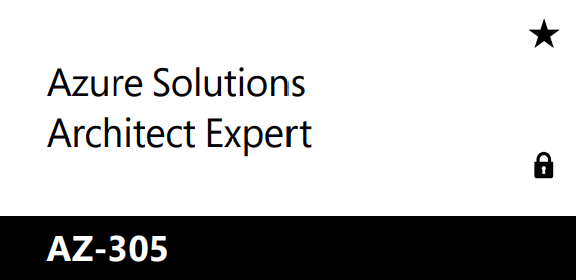
* The star symbol in the top right indicates it is an expert level certification
* The lock symbol in the bottom right indicates there is a prerequisite certification you must hold to be able to get this certification. You can still take the exams, you just won't receive a certification until the prerequisite is met.
I will use the [Microsoft Certified: Azure Solutions Architect Expert](https://learn.microsoft.com/credentials/certifications/azure-solutions-architect/?WT.mc_id=studentamb_165290) as an example. As you can see in this image:
* Each tile contains a different certification.
* Under the certification you can see the exam/s required to get it.
* By clicking on the certification name, you will be directed into the certification webpage.
* After clicking the exam name, you will be directed into the exam webpage.
* The star symbol in the top right indicates it is an expert level certification
* The lock symbol in the bottom right indicates there is a prerequisite certification you must hold to be able to get this certification. You can still take the exams, you just won't receive a certification until the prerequisite is met.
I will use the [Microsoft Certified: Azure Solutions Architect Expert](https://learn.microsoft.com/credentials/certifications/azure-solutions-architect/?WT.mc_id=studentamb_165290) as an example. As you can see in this image:
 (You can find this on every certification page), you need to:
* Complete one prerequisite certification in this case, the [Microsoft Certified: Azure Administrator Associate](https://learn.microsoft.com/credentials/certifications/azure-administrator/?WT.mc_id=studentamb_165290\&practice-assessment-type=certification)
**AND**
* Pass the [AZ-305: Designing Microsoft Azure Infrastructure Solutions Exam](https://learn.microsoft.com/credentials/certifications/exams/az-305/?WT.mc_id=studentamb_165290)
After that you will then receive the Microsoft Certified: Azure Solutions Architect Expert Certification.
:::tip
To pass an exam you need 70% of the total score so your score can't be lower than 700/1000. Scoring is individual and depends on the question set you receive. If you want to get familiar with the testing process, it is thoroughly described in this post: [**How to take Microsoft Exams**](/guide/takingtheexams/).
:::
## Certification Type Comparison
| Certification type | Best for | Focus | Exam time | Renewal |
| --- | --- | --- | --- | --- |
| **Business** | Business Users/Power Users | Business value | 45 min exam time + 20 min NDA/questionnaire | Does not expire (lifetime). |
| **Fundamentals** | Non-technical roles and people new to Microsoft Cloud Products | Core concepts, products, and use cases in each area | 45 min exam time + 20 min for admin | Does not expire (lifetime) |
| **Associate** | Working professionals validating product skills | Deep technical knowledge and practical implementation | 100 min exam time (120 min if lab) + 20 min for admin | Renew yearly. See [Certification Renewal](/guide/certificationrenewal/) |
| **Expert** | Experienced cloud professionals and architects | Technical + architectural depth across services, SKUs, and design decisions | 100 min exam time (120 min if lab) + 20 min for admin | Renew yearly. See [Certification Renewal](/guide/certificationrenewal/) |
| **Specialty** | Professionals specializing in a specific Microsoft product/area | Deep, focused knowledge of one product area and its cloud fit | 100 min exam time (120 min if lab) + 20 min for admin | Renew yearly. See [Certification Renewal](/guide/certificationrenewal/) |
:::caution
Associate, Expert, and Specialty exams are role-based and test practical skills, not just course memorization. They can be very difficult without real hands-on experience with the products.
:::
---
### Sources
Exam retake policy | Microsoft Learn
Exam reschedule and cancellation policy | Microsoft Learn
(You can find this on every certification page), you need to:
* Complete one prerequisite certification in this case, the [Microsoft Certified: Azure Administrator Associate](https://learn.microsoft.com/credentials/certifications/azure-administrator/?WT.mc_id=studentamb_165290\&practice-assessment-type=certification)
**AND**
* Pass the [AZ-305: Designing Microsoft Azure Infrastructure Solutions Exam](https://learn.microsoft.com/credentials/certifications/exams/az-305/?WT.mc_id=studentamb_165290)
After that you will then receive the Microsoft Certified: Azure Solutions Architect Expert Certification.
:::tip
To pass an exam you need 70% of the total score so your score can't be lower than 700/1000. Scoring is individual and depends on the question set you receive. If you want to get familiar with the testing process, it is thoroughly described in this post: [**How to take Microsoft Exams**](/guide/takingtheexams/).
:::
## Certification Type Comparison
| Certification type | Best for | Focus | Exam time | Renewal |
| --- | --- | --- | --- | --- |
| **Business** | Business Users/Power Users | Business value | 45 min exam time + 20 min NDA/questionnaire | Does not expire (lifetime). |
| **Fundamentals** | Non-technical roles and people new to Microsoft Cloud Products | Core concepts, products, and use cases in each area | 45 min exam time + 20 min for admin | Does not expire (lifetime) |
| **Associate** | Working professionals validating product skills | Deep technical knowledge and practical implementation | 100 min exam time (120 min if lab) + 20 min for admin | Renew yearly. See [Certification Renewal](/guide/certificationrenewal/) |
| **Expert** | Experienced cloud professionals and architects | Technical + architectural depth across services, SKUs, and design decisions | 100 min exam time (120 min if lab) + 20 min for admin | Renew yearly. See [Certification Renewal](/guide/certificationrenewal/) |
| **Specialty** | Professionals specializing in a specific Microsoft product/area | Deep, focused knowledge of one product area and its cloud fit | 100 min exam time (120 min if lab) + 20 min for admin | Renew yearly. See [Certification Renewal](/guide/certificationrenewal/) |
:::caution
Associate, Expert, and Specialty exams are role-based and test practical skills, not just course memorization. They can be very difficult without real hands-on experience with the products.
:::
---
### Sources
Exam retake policy | Microsoft Learn
Exam reschedule and cancellation policy | Microsoft Learn